- The TaxFetch Partner Programme lets Chartered Accountants and tax professionals get paying clients delivered automatically — no marketing, no chasing leads.
- Work flexibly from anywhere through your own secure expert dashboard (TaxExpert Portal).
- Free to apply. Once verified, clients are matched and routed straight to you.
- Build your rating, complete consultations and ITR filings, and earn online on your own schedule.
If you are a Chartered Accountant or tax professional, you already know the hardest part of practice is not the work — it is finding a steady stream of clients. The TaxFetch Partner Programme flips that around: we deliver paying clients straight to your secure dashboard, and you focus on doing great tax expert and e-CA consultation. This is your complete guide to CA empanelment on TaxFetch — how it works, what you get, and how to apply.
Become a Tax Expert or e-CA on TaxFetch
Join India’s growing network of tax experts and Chartered Accountants. We deliver paying clients straight to your secure dashboard — you focus on great consultation.
What is the TaxFetch Partner Programme?
It is a partner network for verified tax experts and Chartered Accountants to offer online consultation and ITR filing to TaxFetch users. Instead of building your own funnel, you plug into ours. Thousands of users come to TaxFetch for tools and help every month; when they buy a consultation or filing plan, those paying clients are allocated to verified experts like you and routed to your dashboard.
Why join? The benefits
- Clients delivered to you. No marketing, no cold outreach — paying clients are matched and routed to your dashboard automatically.
- Work anywhere, anytime. Consult and file entirely online, on a schedule that fits your practice or job.
- Your own secure expert portal. A clean dashboard for clients, real-time chat, a document vault and your performance stats.
- Build your reputation. Earn ratings from clients and grow your standing on the platform.
- Free to apply. There is no cost to join the programme.
Inside the expert dashboard (TaxExpert Portal)
Everything you need to serve clients lives in one portal. The moment you log in, you see your performance at a glance and the full list of clients allocated to you.
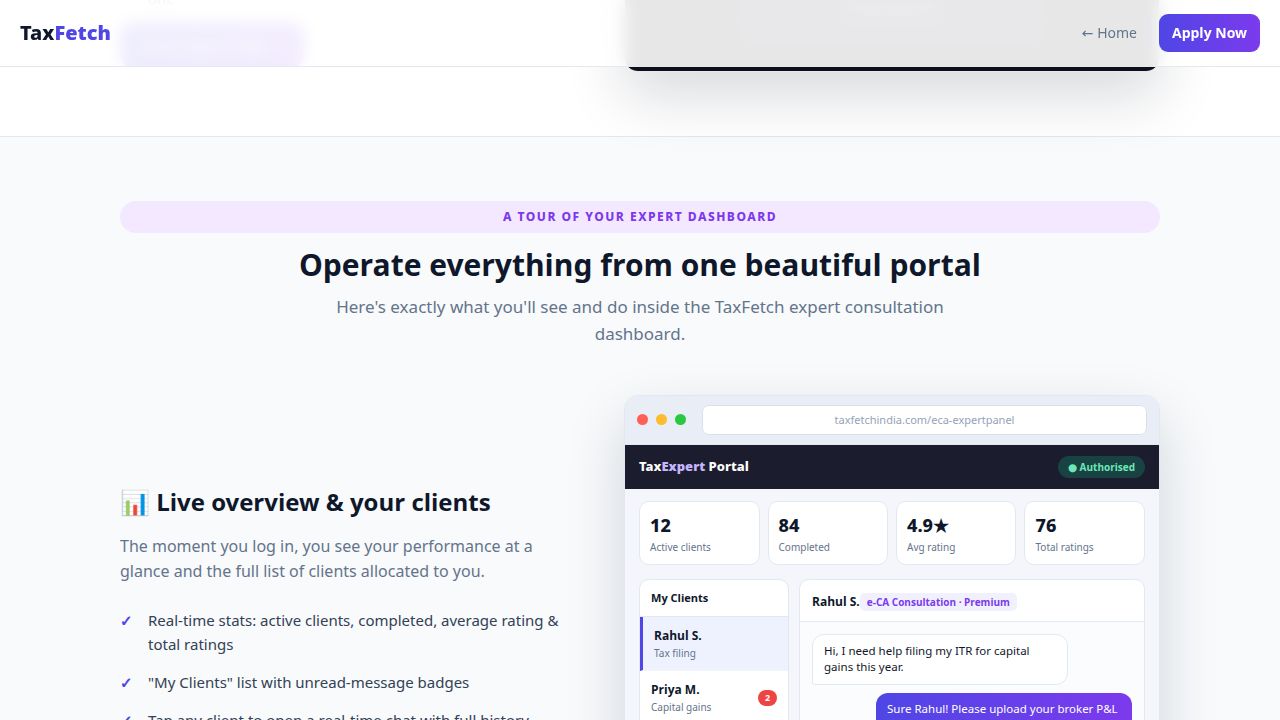
- Live overview — active clients, completed consultations, average rating and total ratings.
- “My Clients” list with unread-message badges so nothing slips through.
- Real-time chat with each client, plus a secure document vault to exchange files.
- Close consultations cleanly with a client-verified OTP.
Become a Tax Expert or e-CA on TaxFetch
Join India’s growing network of tax experts and Chartered Accountants. We deliver paying clients straight to your secure dashboard — you focus on great consultation.
Who can apply?
- Chartered Accountants (CAs) looking for additional online clients or flexible freelance work.
- Tax Experts & consultants with strong income-tax knowledge.
- CAs in practice or in jobs who want to earn on the side, from home.
- Newly qualified professionals ready to build a client base and a rating.
How to apply & get empanelled
- Apply online. Submit your details on the Become a Tax Expert page — it is free.
- Get verified. The TaxFetch team reviews and verifies your profile (empanelment).
- Log in to your portal. Once authorised, sign in to your TaxExpert dashboard.
- Start consulting clients. Paying clients are allocated automatically — chat, share documents and complete consultations from your dashboard.
How you earn
You earn from the consultations and filings you complete for clients allocated to you. Because TaxFetch handles client acquisition, payments and the platform, your time goes into billable work rather than chasing leads. The more clients you serve well — and the higher your rating climbs — the more the platform can route to you.
Frequently Asked Questions
How do I become a tax expert or e-CA on TaxFetch?
Apply for free on the Become a Tax Expert page. After the TaxFetch team verifies your profile (empanelment), you log in to your TaxExpert dashboard and paying clients are allocated to you automatically.
What is CA empanelment on TaxFetch?
Empanelment is the verification step where TaxFetch reviews and approves your profile as a partner expert. Once empanelled and authorised, you can receive and serve allocated clients.
Do I have to find my own clients?
No. TaxFetch allocates paying clients to you automatically. You do not need to do any marketing or chase leads — clients are matched and routed to your dashboard.
Is it free to join the partner programme?
Yes. Applying to the TaxFetch Partner Programme is free.
Can I work part-time or from home?
Yes. The work is fully online through your expert dashboard, so you can consult and file from anywhere, on a schedule that suits you.
How does e-CA expert consultation work for partners?
Each allocated client opens a secure chat in your expert dashboard. You message in real time, exchange documents through a private vault, and close the consultation with a client-verified OTP.
Apply to the TaxFetch Partner Programme
Turn your tax expertise into a steady online practice — without the marketing grind. Get verified, get clients delivered, and earn from your own secure dashboard. Apply to become a Tax Expert or e-CA →