For CAs & Tax Professionals

Client bank statement to Section 68/69 red-flag report in seconds

Upload a client’s statement (PDF or Excel, 32+ Indian banks) and get the analysis an Assessing Officer would do — ₹2 lakh cash days (Sec 269ST), unexplained round-figure credits (Sec 68), SFT-004 thresholds, Sec 194N withdrawals and quick in-and-out rotation — ready for tax audit season and scrutiny replies.

Sec 68/69ARed-flag screening
₹2L / day269ST cash days
SFT-004AIS thresholds
32+ banksPDF & Excel

The working paper your scrutiny reply starts from

Every tax audit and every Section 143(3) scrutiny starts at the same place: the client’s bank statement. Cash deposits, round-figure credits, repeated receipts from one party, money that comes in and goes straight out — an Assessing Officer scans for these patterns first, and so should you.

TaxFetch does that scan in seconds. Upload the statement and the CA Red-Flag tab lists every day cash deposits crossed ₹2 lakh (Sec 269ST exposure), every single deposit above ₹50,000 (Rule 114B), round-figure credits that look like Sec 68 unexplained cash credits, repeated credits from one party (Sec 269SS loans), aggregate SFT-004 and Sec 194N threshold breaches, and quick rotation that resembles accommodation entries — each with the section reference and what to verify.

The dedicated CA tool keeps the workflow focused: review the parsed summary and every transaction, then open one consolidated CA Red Flags working paper with the exact entries behind each alert.

How do CAs analyse a bank statement for cash deposits and Section 68 red flags?

CAs screen a client’s bank statement for the same patterns an Assessing Officer checks: days where cash deposits crossed ₹2 lakh (Section 269ST exposure), single cash deposits of ₹50,000+ requiring PAN, round-figure credits with no business narrative (Section 68 unexplained cash credits), repeated credits from one party (possible Section 269SS loans), and money rotated in and out quickly (accommodation entries). TaxFetch automates this entire screening from one statement upload.

Banks report aggregate cash deposits of ₹10 lakh or more in savings accounts to the Income Tax Department under Rule 114E (SFT-004), and these appear in the client’s AIS. · Source: Income Tax Department, Government of India

Cash thresholds every CA checks in a bank statement

PatternProvisionConsequence
₹2 lakh+ cash received in a daySec 269ST100% penalty u/s 271DA
Unexplained credit in books/bankSec 68Taxed at 60%+ u/s 115BBE
Cash loan/deposit of ₹20,000+Sec 269SSPenalty equal to amount u/s 271D
Cash deposits ₹10 lakh+/year (savings)Rule 114E SFT-004Reported to ITD, appears in AIS
Cash withdrawals ₹1 crore+/yearSec 194NTDS deducted by the bank
Run the red-flag scan before the return is filed, not after the notice arrives — sourcing a cash deposit is easy in July and painful in a 143(3) hearing.— CA Juber Attar, TaxFetch e-CA Tax Expert

What this tool does for you

Everything you need, built in — no spreadsheets, no guesswork.

🚩

Sec 68/69A red-flag report

Round-figure credits, repeated receipts from one party and rotation patterns — the classic unexplained-credit candidates, listed with amounts and dates.

💵

₹2 lakh cash-day detection

Every day the client’s cash deposits crossed ₹2 lakh is flagged for Sec 269ST verification, plus each ₹50,000+ deposit needing PAN (Rule 114B).

📡

SFT & AIS thresholds

Instantly see if aggregate cash deposits crossed the ₹10 lakh SFT-004 reporting line the bank sends to the department — before the AIS mismatch does.

🏧

Sec 194N withdrawal check

Aggregate cash withdrawals are tested against the ₹1 crore (and ₹20 lakh non-filer) TDS thresholds, so you can reconcile 26AS credit.

📑

Tax-audit ready working paper

Each flag carries its section reference and what to verify — use it to direct vouching instead of scanning hundreds of rows by hand.

🏦

32+ Indian banks, any format

SBI, HDFC, ICICI, Axis, PNB, BoB and more — PDF (even password-protected) or Excel, single or multiple statements.

See it in action

A look inside CA Bank Statement Analysis

This is exactly what you'll see when you open the tool.

taxfetchindia.com/tools/ca-bank-statement-analyzer
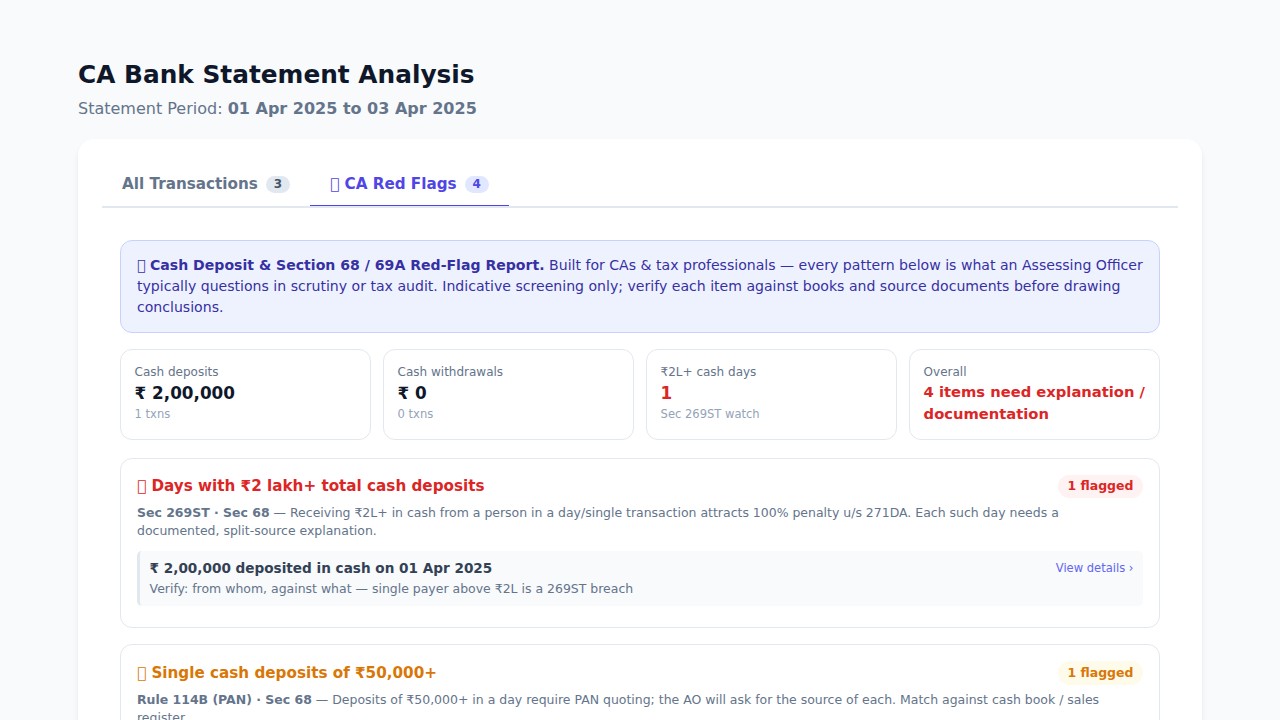
Screenshot of the CA Bank Statement Analysis tool

Upload a client’s bank statement (PDF or Excel) and get the CA Red-Flag report — cash deposit screening, Section 68/69A patterns and SFT thresholds in one view.

Try CA Bank Statement Analysis →
Watch it work

See CA Bank Statement Analysis in action

A live demo of what happens the moment you run the tool.

Real results

See what CA Bank Statement Analysis gives you

Actual screens from the tool — here is exactly what your result looks like.

taxfetchindia.com/tools/ca-bank-statement-analyzerThe actual CA Red-Flag report

The actual CA Red-Flag report

Review cash-deposit totals, ₹2 lakh cash days, Section 269ST exposure, Rule 114B deposits, Section 68 candidates and the exact transactions needing explanation or documentation.

Try CA Bank Statement Analysis →

How it works

From start to result in four simple steps.

1

Upload the statement

Drop the client’s bank statement PDF or Excel — password-protected files work too.

2

Instant parse

TaxFetch reads every transaction, verifies balances and totals deposits, withdrawals and cash.

3

Open CA Red Flags

Switch to the 🚩 CA Red Flags tab for the Section 68/69A, 269ST, SFT and 194N screening.

4

Verify & document

Use each flagged item as a vouching point — download the full analysis for your working papers.

What users say

Loved by taxpayers across India

Real people who got things done faster with CA Bank Statement Analysis.

★★★★★
During tax audit season I run every client statement through this before touching the books. The ₹2 lakh cash-day list alone saves my article two days of Excel work.
CRCA Rohan KulkarniPractising CA, Pune✔ Verified
★★★★★
Got a 143(3) notice questioning cash deposits. This report gave me the exact dates and amounts to build the source explanation. Reply filed in a day.
CMCA Meenakshi IyerTax practitioner, Chennai✔ Verified
★★★★★
The round-figure credit screening thinks like an AO. It caught a ₹5 lakh entry my client had completely forgotten was a friendly loan — we papered it before filing.
CACA Arjun BansalCA firm partner, Delhi✔ Verified
★★★★★
I use the SFT threshold check to warn clients before the AIS surprises them. Clients think we are psychic.
NDNitin DeshmukhTax consultant, Nagpur✔ Verified
★★★★★
Uploads password-protected PDFs from every bank my clients use. One tool for statement analysis, red flags and ITR intelligence.
CFCA Farhan ShaikhPractising CA, Mumbai✔ Verified

Frequently asked questions

Everything you need to know before you start.

What does the CA Red-Flag report check?

It screens the statement for the patterns Assessing Officers question: days with ₹2 lakh+ total cash deposits (Sec 269ST exposure), single cash deposits of ₹50,000+ (Rule 114B PAN requirement), round-figure credits that are Sec 68 unexplained-cash-credit candidates, repeated credits from the same party (possible Sec 269SS loans), aggregate cash deposits crossing the ₹10 lakh SFT-004 reporting threshold, cash withdrawals against the Sec 194N TDS thresholds, and quick in-and-out rotation resembling accommodation entries.

Is this a substitute for my own verification?

No — it is a screening working paper. Each flag tells you what to verify (source documents, confirmations, PAN, mode of receipt). Thresholds like ₹2 lakh under Sec 269ST apply per person/event, which a bank statement alone cannot establish; the report directs your vouching, it does not conclude.

Which banks and formats are supported?

32+ Indian banks including SBI, HDFC, ICICI, Axis, PNB, Bank of Baroda, Kotak, Canara and more — as PDF (including password-protected files) or Excel. You can upload multiple statements together and analyse them as one period.

Is client data safe?

Statements are processed to generate your analysis and are not sold or shared. You can use the tool without exposing client credentials — only the statement file is needed.

Does it help with tax audit (Sec 44AB) too?

Yes. The cash deposit/withdrawal totals, ₹2 lakh cash days and repeated-party credits map directly to the cash-transaction reporting and Sec 269SS/269ST disclosures in Form 3CD, so you can populate those clauses from one report.

What does it cost?

Uploading and seeing the summary is free. Signing in unlocks the full transaction detail, the CA Red-Flag tab and report downloads — with a free first run to try it on a real statement.

Explore more TaxFetch tools

A complete toolkit for your taxes — all in one place.

Ready to try CA Bank Statement Analysis?

It's quick, easy and your first use is free. See it work for yourself.

Try the tool →