1
How to use the TaxFetch Tally Tool
Upload a bank statement, review suggested ledgers and heads, then prepare Tally XML or Excel for import.
Stop re-typing bank entries into Tally. Upload a supported PDF or Excel statement from 46 banks, review the auto-suggested ledger heads and download Tally-ready XML or Excel.
Bank-entry punching is the most repetitive task in bookkeeping: someone opens the client’s statement, reads each line, decides the ledger — rent, salary, bank charges, a vendor — and types a voucher into Tally. A year’s statement means hundreds of vouchers typed by hand.
TaxFetch already parses and categorises every transaction in the statement. The Tally Export tab turns that into accounting vouchers automatically: payments and receipts get suggested ledger heads from the transaction category, cash deposits and withdrawals become Contra entries, and a counterparty that repeats — a supplier, a customer, a regular UPI vendor — is grouped into its own ledger.
You review the suggestions in a table (every ledger name is editable), then download a Tally XML. Import it via Gateway of Tally → Import Data and every voucher appears in the books — ledger masters are created automatically by the same file. You can also download a TallyPrime-style Excel workbook with Accounting Voucher, Ledger and Import Instructions sheets.
Upload the bank statement PDF or Excel to TaxFetch, open the Tally Export tab, and every transaction is converted into a Receipt, Payment or Contra voucher with a suggested ledger head — rent, salary, bank charges, and repeated vendors grouped into their own ledgers. Review or edit the ledger names, download the Tally XML, and import it via Gateway of Tally → Import Data. Missing ledger masters are created automatically by the same file.
7.28 crore income tax returns were filed for AY 2024-25, illustrating the scale of record preparation and reconciliation work across India. · Source: Press Information Bureau, Government of India
| Transaction in statement | Voucher type | Suggested ledger |
|---|---|---|
| Money received (NEFT/UPI credit) | Receipt | Income head or party ledger |
| Money paid (NEFT/UPI debit) | Payment | Expense head or party ledger |
| Cash deposit / ATM withdrawal | Contra | Cash ↔ Bank ledger |
| Repeated vendor or customer | Receipt/Payment | Own Sundry Debtor/Creditor ledger |
Bookkeeping is the most repetitive task in a CA office — converting the statement once and importing it beats typing every voucher by hand.— CA Juber Attar, TaxFetch e-CA Tax Expert
Everything you need, built in — no spreadsheets, no guesswork.
Receipt, Payment and Contra vouchers generated per transaction — import via Gateway of Tally → Import Data in one step.
Rent, salary, interest, bank charges, insurance, EMI and more — mapped automatically from the transaction category.
A counterparty that repeats becomes its own Sundry Debtor / Creditor ledger — 40 payments to one supplier land in one ledger.
Every suggested ledger name is editable in the review table, so what enters the books is what you approve.
Ledgers that don’t exist in the company yet are created automatically by the import file — no pre-setup in Tally.
Download Accounting Voucher, Ledger and Import Instructions sheets in one review-friendly workbook.
This is exactly what you'll see when you open the tool.

Upload a bank statement (PDF or Excel) and get every transaction converted into Tally-ready vouchers with suggested ledger heads — download as Tally XML and import in one step.
A live demo of what happens the moment you run the tool.
Actual screens from the tool — here is exactly what your result looks like.
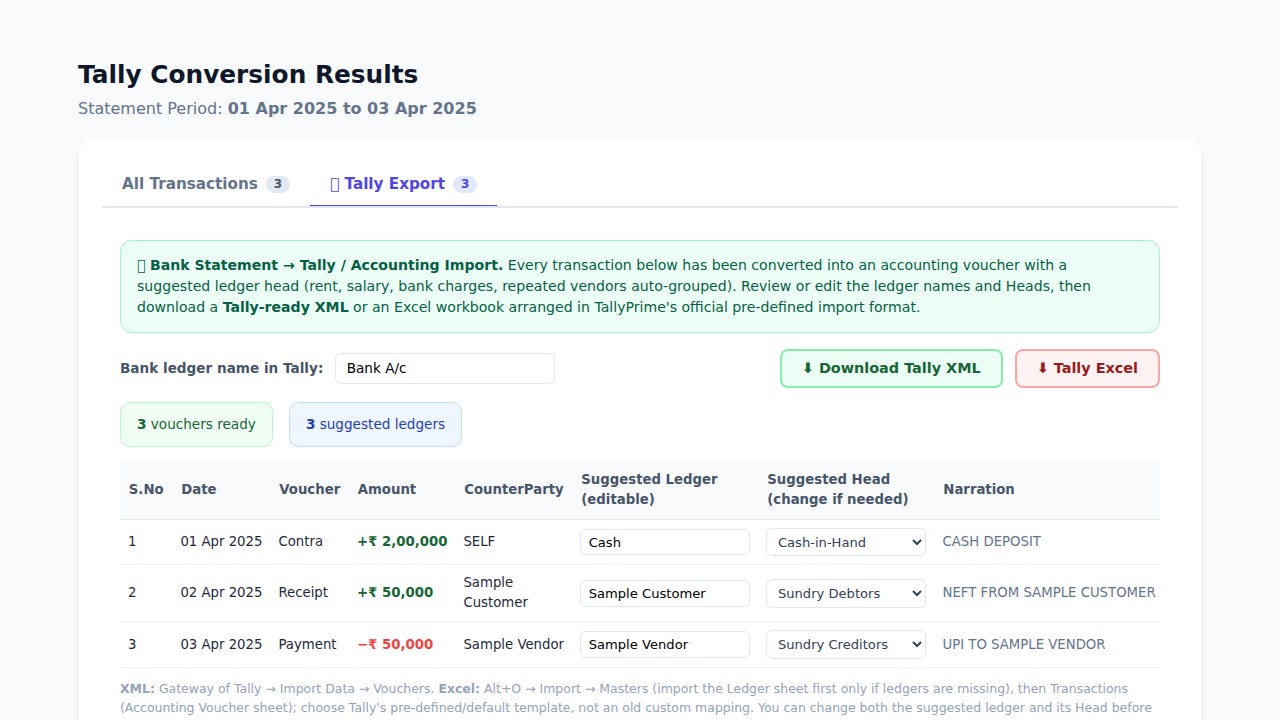
See the real Tally Export table with Receipt, Payment and Contra vouchers, editable ledger names and heads, plus the Download Tally XML and Tally Excel actions.
From start to result in four simple steps.
Upload a supported PDF or Excel statement from any of 46 banks — multiple files together if needed.
Open the Tally Export tab, set your bank ledger name, and edit any suggested head in the review table.
Choose Tally XML for a direct import, or the TallyPrime-style Excel workbook for a review-friendly hand-off.
Import the reviewed file from Gateway of Tally → Import Data; the required voucher and ledger masters are included.
Watch the TaxFetch export process, then follow the XML or Excel import method inside TallyPrime.
Upload a bank statement, review suggested ledgers and heads, then prepare Tally XML or Excel for import.
Follow the correct TallyPrime flow to import the XML vouchers and ledger masters generated by TaxFetch.
Import the Ledger worksheet through Masters first, then import Accounting Voucher through Transactions.
Real people who got things done faster with Bank Statement to Tally.
The ledger suggestions removed the slowest part of bank-entry work. We reviewed the few exceptions, imported the XML and had the month booked in a fraction of the usual time.
Being able to change both the ledger name and the group before download matters. It gives us automation without giving up our chart-of-accounts discipline.
The Tally Excel workbook is ideal for a client review. They can see the suggested heads clearly before we import anything into the company books.
Repeated UPI suppliers are grouped into their own ledgers instead of being dumped into one generic expense head. That saved a lot of cleanup after import.
We process statements from several banks every month. The combination of editable vouchers and a ready-to-import XML has made our bookkeeping workflow much more consistent.
Everything you need to know before you start.
Open the company in Tally, go to Gateway of Tally → Import Data → Vouchers (in TallyPrime: Import → Transactions), and select the downloaded XML file. Vouchers and any missing ledger masters are created automatically.
The file uses Tally’s standard XML import format, which works with TallyPrime and Tally.ERP 9.
Each transaction’s detected category maps to a standard ledger (rent to Rent Paid, bank charges to Bank Charges, salary credit to Salary Received, and so on). Counterparties that appear repeatedly get their own Sundry Debtor or Creditor ledger. Everything else goes to Suspense so nothing is silently mis-posted — and every name is editable before download.
They are generated as Contra vouchers between Cash and your bank ledger, the way an accountant would enter them.
46 banks across 7 countries, with PDF, password-protected PDF, Excel or CSV support depending on the bank. Multiple statements can be processed together.
Uploading and seeing the summary is free. Signing in unlocks the full analysis including the Tally Export tab and downloads — with a free first run to try it on a real statement.
A complete toolkit for your taxes — all in one place.
It's quick, easy and your first use is free. See it work for yourself.
Try the tool →